
Start every morning knowing your e-resources work.
Automated E-Resource Verification.
PatronPath simulates real patron behavior to verify your critical e-resources are accessible. We run comprehensive daily audits so your team starts every day knowing exactly what is working and what isn't.
Why wait for an angry email?
Most libraries check their resources manually, at best once a year. Between audits, a database can sit behind a paywall for months with no error page, no alert, no ticket. Just silence. By the time a patron or faculty member reports it, dozens of others have already hit a dead end and moved on.
PatronPath flips the model. Instead of reacting to tickets, you receive a daily verification audit that confirms exactly what is accessible before you even open your inbox.
We navigate the mess so you don’t have to.
We don’t just ping the URL. We act like a patron.
- 1
Step 1: Login
We securely authenticate through your existing remote-access setup (proxy, SSO, or other authentication), simulating a remote patron (student or community member).
- 2
Step 2: Navigate
We follow the full path a remote patron takes: through login pages, consent banners, redirects, and vendor landing pages, catching the failures that simple link-checkers miss.
- 3
Step 3: Verify
We verify that the final vendor page successfully resolves to the target resource. This ensures we’re confirming valid access rights, not just a successful redirect.
Get a screenshot-rich report every morning.
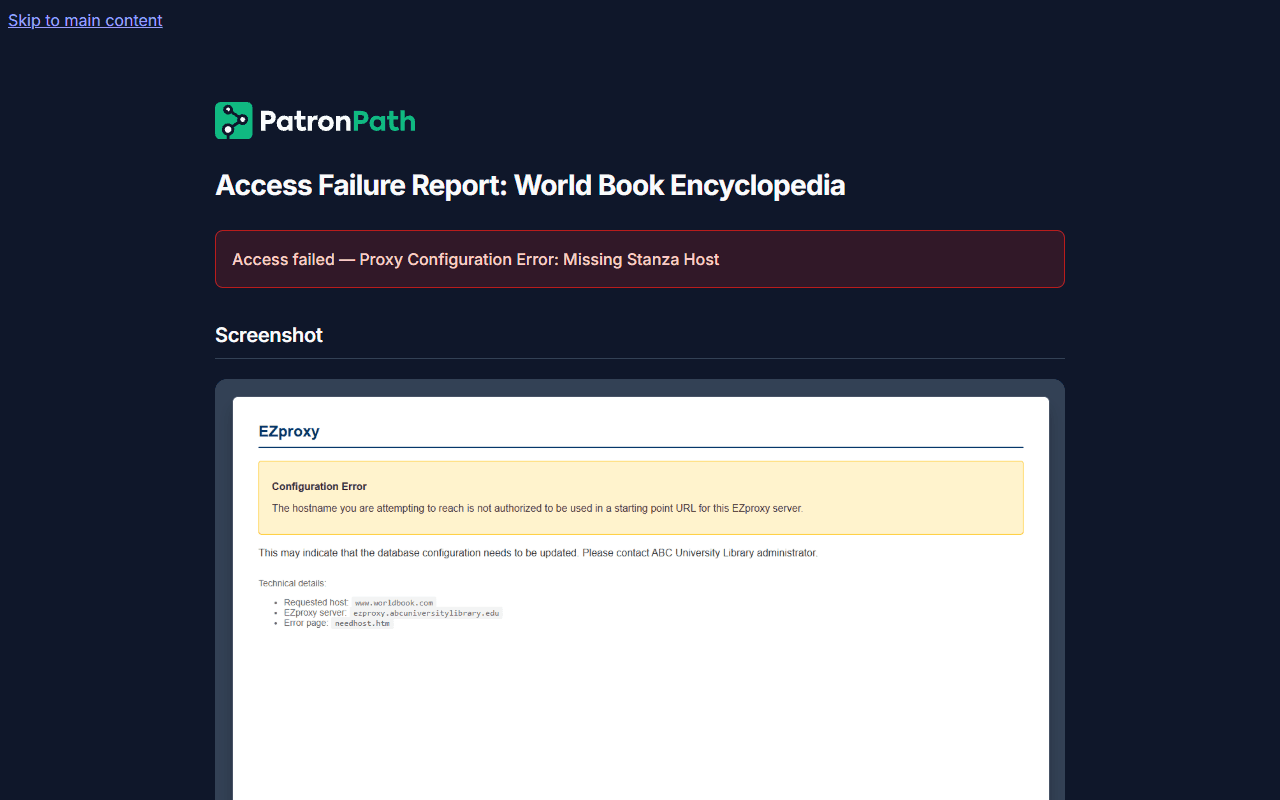
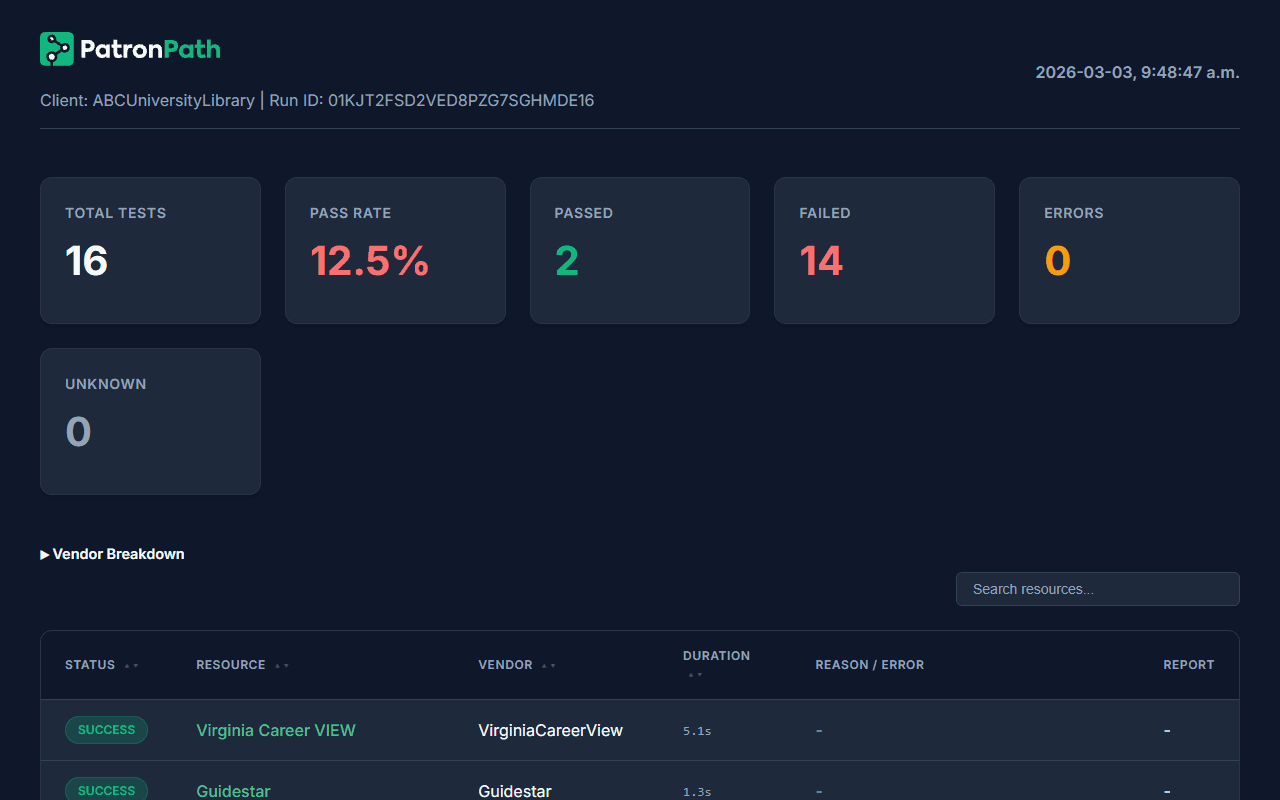
Each failure arrives pre-diagnosed, with a plain-language explanation, the evidence to prove it, and a clear next step. Send it directly to the vendor to skip the “it works on my machine” argument.
Each failure report includes a classified diagnosis, timestamped screenshots, and step-by-step navigation evidence, so you know what broke, why, and who to contact.
No integrations. No plugins. No IT projects.
Many verification tools require you to wire directly into your authentication stack, triggering security reviews and endless maintenance. PatronPath is different.
We sit outside your network.
We run on our own managed infrastructure. Because we access your resources exactly like a remote patron does, we don’t need API keys, firewall exceptions, or server access.
Zero installation
We run entirely as a managed service.
Resilient to change
Because we access your resources the same way your patrons do, platform changes that break internal tools don't break our tests. When a vendor updates their site, we adapt.
Secure by design
We use test-only credentials and never store patron data.
Who It's For
E-Resource Librarian
Stop being the last to know. Start your day with a clear picture of what needs attention, each failure pre-diagnosed with a plain-language explanation and the evidence already attached, so you can file vendor tickets in seconds.
Systems Librarian
Get reproducible failure paths without installing local agents or debugging end-user screenshots.
Library Director
Protect your budget. Ensure the resources you pay for are actually reachable by the community you serve.
Join the beta pilot program
We are inviting a small cohort of academic and public libraries to partner with us for our beta launch.
The pilot offer:
- White-glove setup: We configure your eligible A–Z list resources for you.
- Minimal IT involvement: No server access or API keys needed.
- Up to 2 months free: Full access to the verification engine during the pilot period.
Your commitment:
- One 15-minute feedback call per month.
- Permission to publish a joint case study if we successfully detect errors for you.
FAQ
What is PatronPath?
PatronPath is an automated digital resource assurance service for libraries. Unlike simple uptime checks, it acts as a synthetic patron, simulating the complete login and navigation journey to verify that off-campus users can successfully access licensed databases and journals.
Why do library databases stop working for off-campus users?
Off-campus access depends on a chain of systems (proxy servers, single sign-on, and vendor platforms) that can break silently at any point. A vendor platform update, an expired authentication certificate, or a misconfigured proxy entry can cut off remote access with no error message and no alert. The library typically discovers the problem only when a patron complains. PatronPath detects these silent failures automatically by simulating the full patron journey every day.
How does User Journey Testing work?
User Journey Testing (or Synthetic Transaction Monitoring) verifies the entire access path rather than just a single URL. PatronPath automates this by executing real browser sessions that navigate the library portal, pass through authentication (SSO/Proxy), and validate the final vendor resource loads correctly.
Do we have to host or maintain anything ourselves?
No. PatronPath is a managed assurance service. You don’t install agents or stand up servers. We operate the tests on our own managed infrastructure and deliver reports to your team.
What exactly does PatronPath verify – and what doesn’t it?
We focus on the patron access journey to your licensed e-resources: A–Z lists, remote-access flows (proxy/SSO), and vendor platforms. We do not replace your ILS, discovery layer, or campus IT monitoring. We don’t track general network uptime or server health; we test whether a typical patron can actually reach and use the content you’re paying for.
Do you test remote access specifically?
Yes. Most access failures happen off-site. Our tests are designed around the remote-patron journey, using test accounts you provide, so we can see what your community sees when they’re not on campus or in the building.
How do you handle credentials and patron data?
We only use test credentials that you provide for verification. During the beta we do not ask for or process patron names, emails, IDs, or any real patron identifiers. Credentials are stored securely with least-privilege access, and logs/screenshot retention is limited and documented on our Security and Privacy pages.
Will this flood us with alerts?
No. During the beta, we typically run checks on a scheduled basis (for example, nightly) and send batched, screenshot-rich reports, not one email for every transient error. We work with you to focus on high-impact resources and keep noise low.
Do you open vendor support tickets for us?
No. You keep full control of vendor relationships. PatronPath gives you vendor-ready evidence (URLs, timestamps, error text, screenshots, and environment details) so you can file a clear ticket in seconds instead of spending hours reproducing the issue.
What do you need from our IT or systems team to get started?
Typically: a small number of test accounts, agreement on which networks or remote-access paths to test, and a quick security review. There’s no on-prem install or firewall change required for the desktop-run beta; details are documented on our Security page.
How soon will we see value?
Libraries can start seeing actionable insights within the first few days of verification. In many pilots, the first report already surfaces misconfigurations or broken links that hadn’t yet generated patron complaints.
What about resources behind Cloudflare or bot detection?
Some vendors use aggressive bot detection that can block automated testing. PatronPath detects and reports these challenges so you can track patterns and follow up with the vendor, but we’re transparent about what we can and can’t verify. We’d rather tell you honestly than give you a false green light.